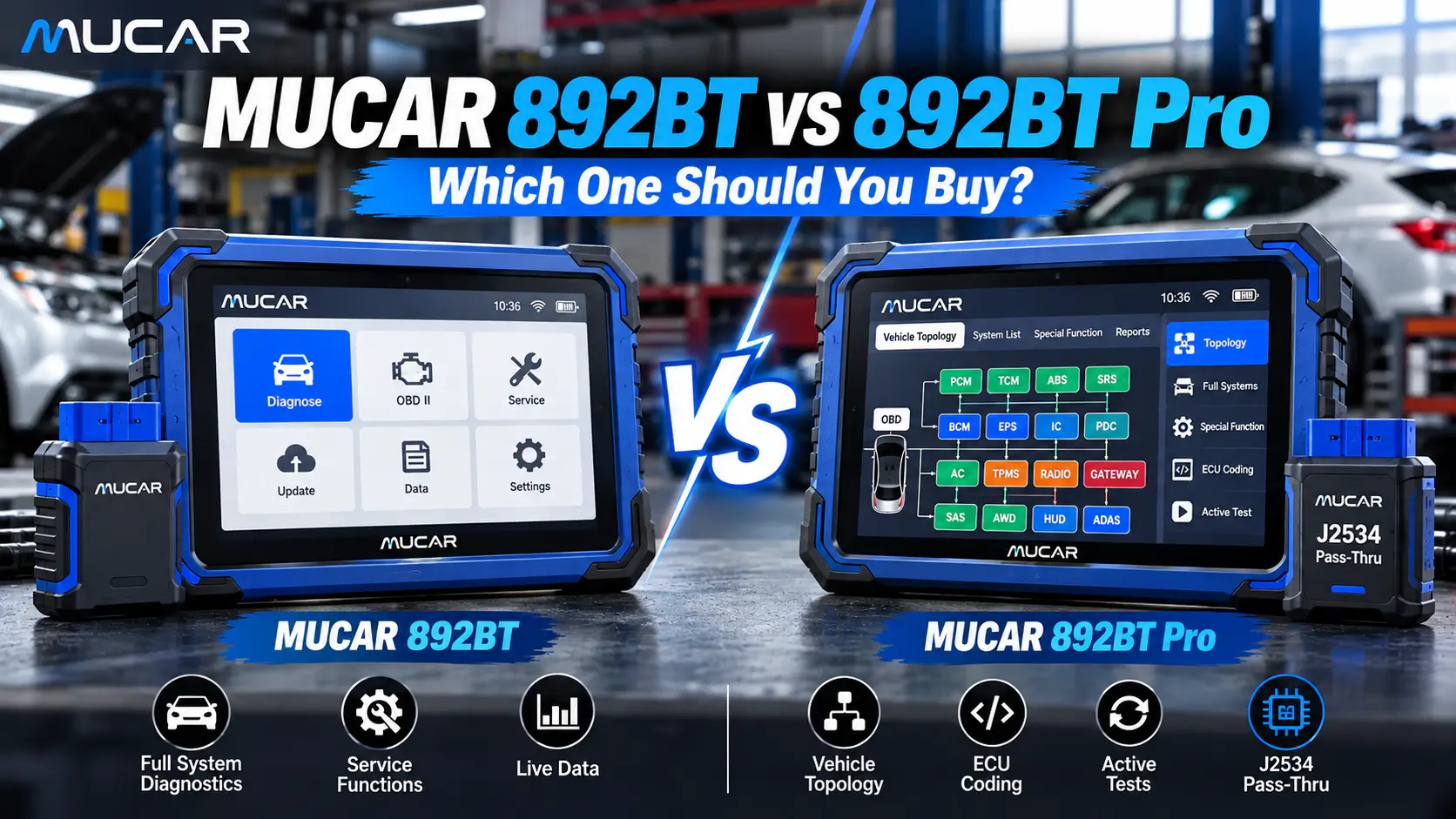
The MUCAR 892BT and the MUCAR 892BT Pro look identical: the same 8-inch tablet, the same Bluetooth VCI, the same 35+ service functions and the same lifetime updates with no annual fee. The difference is two features – graphical ECU topology and J2534 Pass-Thru – and whether you need them depends on one question: do you program control units, or do you diagnose and code them?
This guide explains what each version can and cannot do, who should buy which, and why you should decide before ordering – because the 892BT cannot be upgraded to the Pro later.
Quick answer
- Buy the MUCAR 892BT if you read and clear fault codes, run active tests, do service resets and code comfort functions. It covers most daily work in independent workshops and for serious DIY users.
- Buy the MUCAR 892BT Pro if you need to see communication faults across the vehicle network at a glance, or if you want to use manufacturer software such as ODIS, ISTA or XENTRY on a Windows PC to flash control units via J2534.
MUCAR 892BT vs 892BT Pro: comparison table
| Feature | MUCAR 892BT | MUCAR 892BT Pro |
|---|
| Tablet | 8" touchscreen, 1280 × 800 | 8" touchscreen, 1280 × 800 |
| RAM / storage | 4 GB / 64 GB | 4 GB / 64 GB |
| Vehicle connection | Bluetooth 5.0 VCI | Bluetooth 5.0 VCI |
| Protocols | OBD2/EOBD, CAN FD, DoIP | OBD2/EOBD, CAN FD, DoIP |
| Full-system diagnostics | Yes | Yes |
| Bidirectional (active) tests | Yes | Yes |
| ECU coding & adaptations | Yes (vehicle-dependent) | Yes (vehicle-dependent) |
| Service functions | 35+ | 35+ |
| Graphical ECU topology | No | Yes |
| J2534 Pass-Thru (OEM software) | No | Yes |
| ECU flashing / programming | No | Yes, via J2534 + OEM software |
| Software updates | Lifetime, no annual fee | Lifetime, no annual fee |
| Upgrade to Pro later | Not possible | – |
What both versions do equally well
For most jobs, you will not notice any difference between the two tablets. Both give you:
- Full-system diagnostics – engine, transmission, ABS, airbag, body and comfort modules, not just the engine ECU.
- Bidirectional tests – switch the radiator fan, fuel pump, injectors or window motors on from the tablet to check a component without removing it.
- ECU coding – activate or adapt supported comfort functions and code replacement parts.
- 35+ service functions – oil reset, EPB, DPF regeneration, BMS battery registration, SAS, TPMS, throttle adaptation, injector coding and more, depending on the vehicle.
- CAN FD and DoIP – needed for newer vehicles from GM, Ford, BMW, Volvo, Jaguar Land Rover and others.
- Lifetime software updates with no yearly update fee for the MUCAR diagnostic software.
What the Pro adds: topology
Topology shows every control unit in the vehicle as a network map, colored by status: communicating, stored faults, or not responding. When a car has twenty fault codes spread across ten modules, the topology view shows you quickly whether the real cause is one module that dropped off the CAN bus – instead of chasing every code one by one.
This saves the most time on communication faults, water damage, after-accident repairs and electrical problems where several modules report errors at once. If you mainly do service work and single-system faults, you will rarely need it.
What the Pro adds: J2534 Pass-Thru
J2534 lets you use the Pro's VCI as an interface for manufacturer software on a Windows PC – for example ODIS (VW Group), ISTA (BMW) or XENTRY (Mercedes-Benz). That is how workshops flash control units with new software, program replacement modules and install software updates that the manufacturer released for a known fault.
Keep in mind:
- The OEM software, its license and any online access are not included – you buy them from the vehicle manufacturer.
- Programming is done on the PC, not on the tablet.
- Use a stable battery support unit during any flashing procedure.
The standard 892BT can code and adapt, but it cannot flash new software into a control unit.
Real example: radiator fan does not start
The engine runs hot and the fan stays off. With either tablet you read the codes, check the coolant temperature in live data, and trigger the fan with an active test. If the fan runs on command, the fan and wiring are fine and you look at the control side. If it does not, you test power and ground at the fan.
With the Pro, if the engine ECU cannot talk to the fan control module, the topology view shows that module as not communicating – and you go straight to the network or module power supply. With the standard 892BT you get there too, just by checking the modules one by one.
Security Gateway: same for both
On newer FCA (Jeep, Fiat, Alfa Romeo, Dodge, Chrysler), Mercedes-Benz and Volkswagen Group vehicles, a Security Gateway blocks active tests, coding and fault-code clearing until the tool is authorized. Reading codes is usually still possible. Both the 892BT and the 892BT Pro need the same optional unlock license:
More on this in our guide Security Gateway (SGW) explained.
Who should buy which?
MUCAR 892BT is the right choice for
- Independent workshops that do diagnostics, service and repairs, but send ECU programming to a specialist
- Mobile mechanics who need a light wireless tablet with active tests
- Experienced DIY users and fleet owners who want more than a code reader
- Anyone who wants the best price-to-function ratio
MUCAR 892BT Pro is the right choice for
- Workshops that already use or plan to use OEM software (ODIS, ISTA, XENTRY and others)
- Auto electricians who often work on network and communication faults
- Workshops that replace and program control units in-house
If you are unsure, think two years ahead. The price difference is small compared to buying a second tool later – and the standard version cannot be upgraded.
Frequently asked questions
Can I upgrade the MUCAR 892BT to the 892BT Pro later?
No. They are separate hardware and software configurations. Topology and J2534 cannot be activated later.
Are there annual update fees?
No. Both versions get lifetime updates for the MUCAR diagnostic software with no annual fee. Gateway unlocks and manufacturer portals are paid separately.
Can the 892BT Pro program ECUs directly on the tablet?
No. ECU programming with the Pro is done via J2534 using the manufacturer's software on a Windows PC. If you want programming directly on the tablet for BMW and VAG, look at the TOPDON ONE Plus.
Will it work with my car?
Basic diagnostics work on almost every vehicle with an OBD2 port. Coding, active tests and service functions depend on the make, model and year. Send us your VIN via WhatsApp or email before you order and we will check it.
Our recommendation
For most buyers, the MUCAR 892BT is the smarter buy. Choose the MUCAR 892BT Pro only if topology or J2534 programming is part of your real daily work – but if it is, do not save on it, because there is no upgrade path.
View MUCAR 892BT
View MUCAR 892BT Pro